

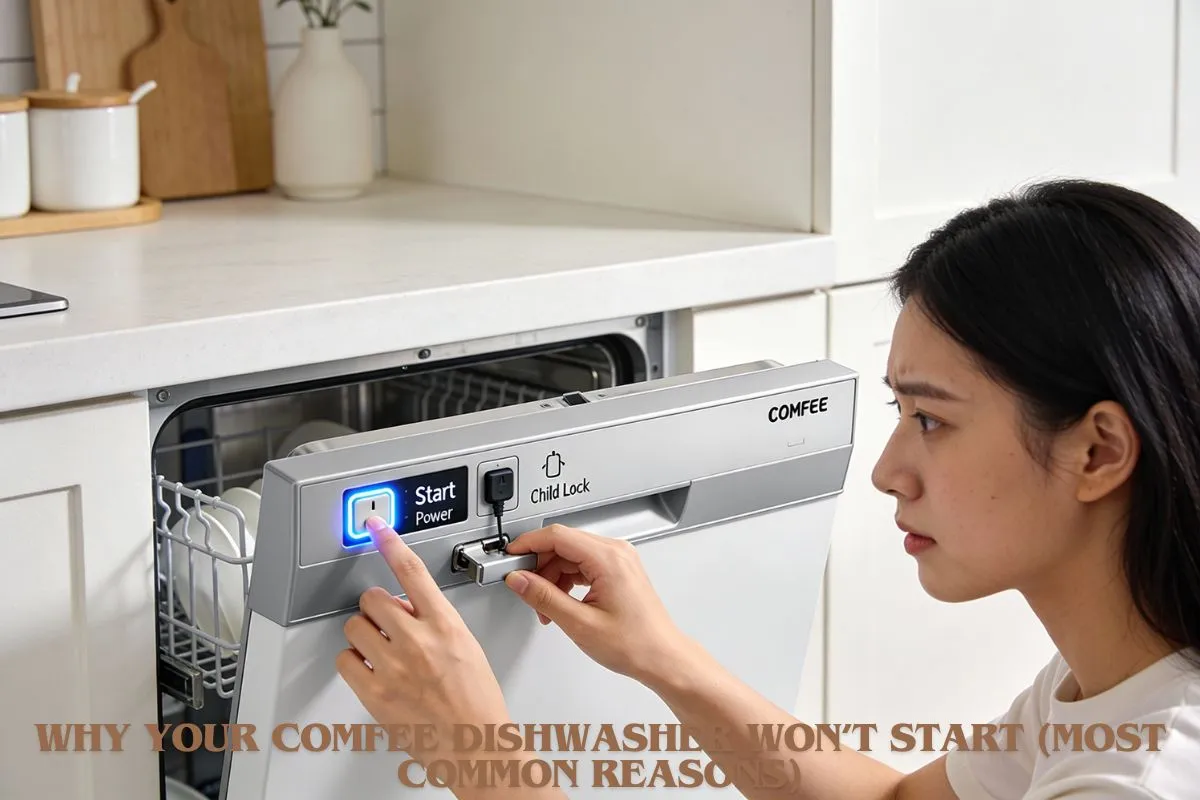
When a COMFEE dishwasher refuses to start, the cause is almost always one of a few basic issues. Think of it like a safety chain: if any link is broken, the machine will stay idle.
1. Door Is Not Fully Closed or Latched
Your dishwasher will never start if the door is not shut tight. There is a latch switch inside the door that tells the machine “it is safe to run now.” If the latch is not engaged, the control board will block the cycle.
Signs this is the problem:
-
You can still see a small gap at the top or side of the door.
-
You hear no click when you push the door closed.
-
Pushing Start does nothing, or the lights blink but the wash does not begin.
What to do:
-
Remove anything blocking the racks so the door can close easily.
-
Push the door firmly until you hear or feel a click.
-
Try starting the cycle again.
In one small apartment kitchen, a chopping board always slid forward and blocked the door from closing fully. The owner thought the dishwasher was broken, but it was simply the board pushing the door back. Once moved, the machine started right away.
2. Child Lock / Control Lock Is On
Many COMFEE models have a control lock or child lock feature. When this is on, the buttons do not respond, and the dishwasher will not start until the lock is turned off.
Typical signs:
-
Pressing Start does nothing, even though the display is lit.
-
A tiny lock symbol or “LOCK” light is on, or a certain button’s light glows steadily.
On many COMFEE dishwashers:
-
You press and hold the Lock button (or sometimes the Delay Start or a key icon) for about 3 seconds to turn the lock on or off.
Check your panel for a small padlock icon above one of the buttons. On some mini and countertop models, the manual says: “Press and hold LOCK for 3 seconds to activate or cancel the control lock option.”
3. Power Supply Problem (Outlet, Plug, or Breaker)
If there is no proper power, the dishwasher will not respond at all, or will shut off mid‑use.
Check these things:
-
Is the plug firmly in the wall socket?
-
Does the outlet work with another device (like a phone charger or kettle)?
-
Is the circuit breaker tripped in your fuse box?
The COMFEE manuals state that if the machine will not turn on, you should:
-
Make sure the dishwasher is turned on at the main switch.
-
Make sure the cord is properly plugged in.
-
Reset or replace the household fuse or breaker if needed.
4. Delay Start Is Turned On by Mistake
Many COMFEE dishwashers have a Delay Start feature that lets you run a cycle later (for example, 3, 6, or 9 hours later). If this is set accidentally, the dishwasher appears “on but not starting.”
How to tell:
-
The display shows a time like “3h”, “6h”, or “9h” instead of a normal cycle time.
-
The machine beeps once and then sits idle.
How to fix:
-
Press the Delay button until the delay time goes back to 0 or the delay indicator switches off.
-
Then choose your program and press Start again.
How Do I Start My COMFEE Dishwasher? (Button‑by‑Button)
Starting a COMFEE dishwasher follows the same simple sequence on most models.
Basic Start Steps (Most COMFEE Models)
-
Load the dishes correctly.
Face the dirty side toward the spray arms. Do not block the spray arms from spinning. -
Add detergent (and rinse aid if needed).
Use the main detergent cup for normal cycles; follow the manual’s amount guide. -
Close the door firmly until it latches.
The machine will not run if the door is not latched. -
Press Power (if there is a separate On/Off button).
-
Select a program.
Use the Program or specific cycle button (Normal, Eco, Heavy, Glass, Rapid, etc.). A light should turn on next to the chosen cycle. -
Press Start / Start–Pause.
On many models, the manual says: “Press Start, the dishwasher begins to start, and the pilot lamp will blink when running.”
On some mini countertop versions, if you open the door during washing, it pauses. When you close the door, you press Start again and the machine resumes after about 10 seconds.
A personal example: the first time I tried a COMFEE mini dishwasher, I kept pressing Program and expected it to start. It did not move at all. Only after reading the tiny line “Then press Start/Cancel” did I notice that last button. Once I pressed Start, the wash began smoothly.
How to Hard Reset COMFEE Dishwasher?
Sometimes, the dishwasher’s internal control board needs a reset to clear errors or a stuck cycle. COMFEE manuals and guides describe a soft reset that is easy to do at home.
Soft Reset (Clearing a Cycle)
On many models:
-
Press Start/Cancel or Start/Pause to pause the washing.
-
Press and hold Start/Cancel for about 3 seconds until the machine goes to standby or cancels the cycle.
-
Wait for the water inside to drain and for the lights to stop blinking.
-
Close the door.
-
Select a new program and press Start again.
Some video guides explain that if you still see error codes or the machine is frozen, you can:
-
Turn off the power at the wall or breaker for about 5 minutes, then turn it back on.
-
Check the door latch, filter, and drain hose afterward.
This is often called a “hard reset,” but remember to always follow the safety steps in the manual.
Why Is My Dishwasher On but Not Starting?
If the lights are on but the wash will not begin, one of these is usually the cause:
-
Door not latched
-
Child lock active
-
Delay start set
-
Wrong buttons pressed or cycle not confirmed
-
An error condition (like low water supply or a fault code)
COMFEE manuals list several items to check when the unit “won’t start”:
-
Make sure the door is closed completely.
-
Check and connect the power supply.
-
Deactivate the child lock.
-
Refer to the reset instructions in the manual if a program is stuck.
If your display shows an error code (for example “E1” on some models), that usually points to a specific problem like water inlet or drain issues, which must be fixed before the cycle will begin.
Why Won’t the Start Button Work on My Dishwasher?
A Start button that does nothing can feel very frustrating. The cause may be simple or more technical.
Simple Causes
-
Child lock is on: buttons are disabled until you unlock them.
-
Door is not closed: Start is ignored if the door switch is open.
-
Program not selected: On many COMFEE units, you must select a program first, then press Start.
Basic Fix Steps
-
Look for a lock icon on the panel. If it is lit, press and hold the lock or delay button for 3 seconds to unlock.
-
Make sure the door is fully shut and latched.
-
Select a program (Normal / Eco / Rapid).
-
Press Start firmly for a full second.
In some support cases, technicians recommend holding the Start button for 3–5 seconds, then unplugging the unit for 2 minutes before trying again. This can clear a minor control glitch.
If the Start button still does not register at all, even after resets and power checks, it may indicate a faulty control panel or a broken button mechanism. In that case, a service call or replacement part might be needed.
Quick 60‑Second Checklist: COMFEE Dishwasher Not Starting
Use this fast list before assuming the machine is broken:
-
Is the door fully shut and latched?
-
Is there a lock symbol or Child Lock on the display? Unlock it.
-
Is a delay time (3h / 6h / 9h) showing? Turn Delay off.
-
Have you selected a program and then pressed Start?
-
Does the outlet work and is the breaker on?
-
Try a soft reset: hold Start/Cancel 3 seconds, wait for drain, then reselect a program.
In many real‑life cases, the fix is found by step 2 or 3: the child lock or delay start was turned on by mistake.
Unique Insight: Think Like the Dishwasher
COMFEE dishwashers follow a simple logic:
“Do I have safe power? Is my door shut? Am I locked? Do I know which cycle to run?”
If any answer is “no,” it will not start. When you troubleshoot, imagine you are the control board asking these questions. This mindset makes it easier to find which piece of the chain is missing.
If you share your exact COMFEE model number (for example, CDC17P0AWW, Mini Plus, or CDWMT201DW‑UK), a more exact button‑by‑button startup guide and reset method can be tailored to that control panel.
Related posts:
 Refrigerator Hacks: Clever Ways to Maximize Your Fridge Space
 How to Tighten Kitchen Faucet Nut Under Sink
 Faucet Leak: How to Fix a Dripping Faucet
 Step-by-Step Guide to Installing Wooden Worktops Yourself
 CDA Oven Error Codes Explained: A Friendly, Complete Guide
 DIY Kitchen Shelving Ideas: 10 Budget-Friendly Storage Solutions That Look Expensive but Cost Less
 How Having the Right Kitchen Tools Makes All the Difference